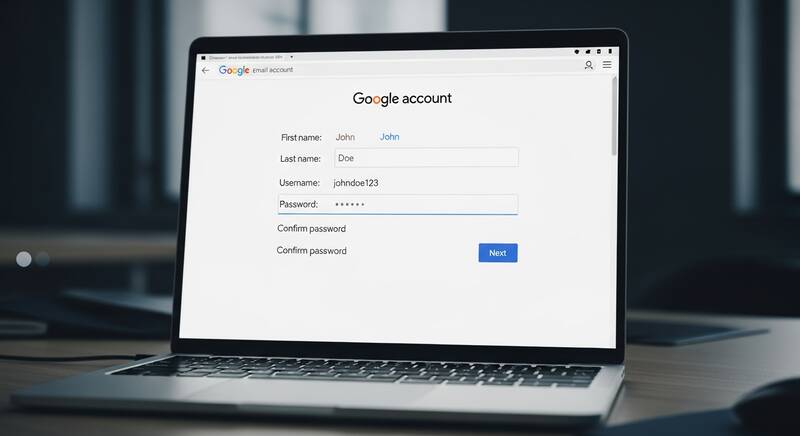
Want to create a Gmail account? Gmail is the world's most popular email service with over 1.8 billion users. Whether you need an email for personal use, work, school, or to sign up for other services — creating a Gmail account is free and takes less than 5 minutes.
In this step-by-step guide, we'll show you how to create a Gmail account on computer, phone, and without a phone number.

What You Need to Create a Gmail Account
- A computer, phone, or tablet with internet access
- A phone number for verification (optional in some cases)
- Your name and date of birth
- A desired email address (username@gmail.com)
How to Create Gmail Account on Computer
- Open your web browser and go to accounts.google.com/signup
- Enter your First name and Last name
- Click Next
- Enter your Date of birth and Gender
- Click Next
- Choose a Gmail address:
- Select a suggested address, or
- Click "Create your own Gmail address" and type your desired username
- Click Next
- Create a strong password (at least 8 characters with letters, numbers, and symbols)
- Confirm your password by typing it again
- Click Next
- Add a recovery phone number (recommended but optional)
- Review the Terms of Service and Privacy Policy
- Click "I agree"
- Your Gmail account is created!
How to Create Gmail Account on Phone (Android & iPhone)
On Android:
- Open Settings → Accounts → Add account → Google
- Tap "Create account"
- Select "For myself"
- Enter your name, date of birth, and desired email address
- Create a password
- Add a phone number (optional)
- Accept terms and your account is ready
On iPhone:
- Open Safari and go to accounts.google.com/signup
- Follow the same steps as the computer method
- Or download the Gmail app from App Store and tap "Create account"
Tips for Choosing a Gmail Username
- Use your real name: firstname.lastname@gmail.com (best for professional use)
- Add numbers: john.smith95@gmail.com (if your name is taken)
- Keep it simple: Easy to remember and spell
- Avoid special characters: Only letters, numbers, and periods are allowed
- Think long-term: You'll use this email for years, so choose wisely
How to Create a Strong Password
Your Gmail password should be:
- At least 8 characters long (12+ recommended)
- Include uppercase and lowercase letters
- Include numbers (0-9)
- Include special characters (!@#$%^&*)
- Example: MyEmail@2026Secure!
Never use: Your name, birthday, "password123", "12345678", or common words.
How to Set Up Gmail After Creating Your Account
1. Add a Profile Picture
- Open Gmail and click your initials icon (top right)
- Click the camera icon
- Upload a photo or take a new one
2. Create an Email Signature
- Click the gear icon → See all settings
- Scroll to Signature section
- Create a new signature with your name, title, and contact info
3. Enable 2-Factor Authentication
- Go to myaccount.google.com/security
- Click 2-Step Verification
- Follow the setup to add your phone number
- This adds an extra layer of security to your account
4. Set Up Gmail on Your Phone
- Download the Gmail app (Android/iOS)
- Sign in with your new account
- Enable notifications so you don't miss important emails
How to Create Multiple Gmail Accounts
Yes, you can create multiple Gmail accounts. Google allows you to have as many accounts as you need:
- One for personal use
- One for work or business
- One for online shopping and subscriptions
You can switch between accounts easily in the Gmail app or browser by clicking your profile picture and selecting another account.
FAQ
Is Gmail free?
Yes, Gmail is completely free for personal use. You get 15GB of free storage shared across Gmail, Google Drive, and Google Photos.
Can I create Gmail without a phone number?
In some cases, Google allows account creation without phone verification. However, for security purposes, adding a phone number is recommended for account recovery.
Can I change my Gmail address after creating it?
No, you cannot change your Gmail address once created. You would need to create a new account with a different address. However, you can change your display name at any time.
How much storage does a free Gmail account get?
Every free Gmail account gets 15 GB of storage shared between Gmail, Google Drive, and Google Photos. You can upgrade storage with Google One plans starting at $1.99/month for 100GB.
Conclusion
Creating a Gmail account is quick, free, and gives you access to all Google services including Drive, YouTube, Google Photos, and more. Follow the steps in this guide to set up your account in less than 5 minutes. Don't forget to enable 2-Factor Authentication for security and add a recovery phone number to protect your account!