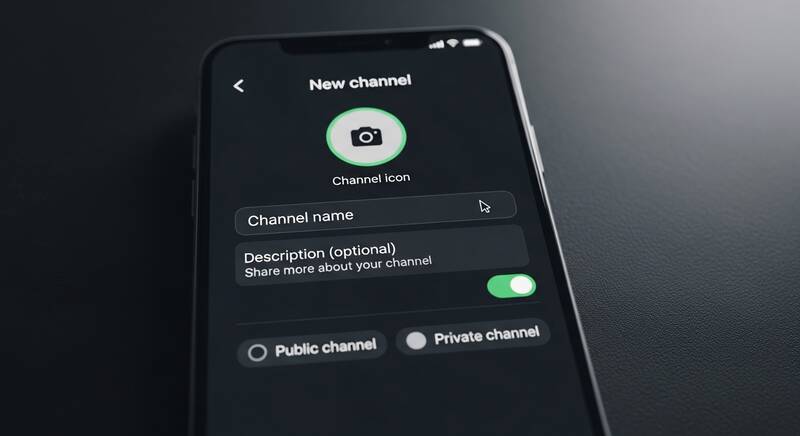
Want to create a WhatsApp Channel? WhatsApp Channels is a powerful broadcast feature that lets you share updates with unlimited followers. Unlike groups, channels are one-way communication — perfect for businesses, creators, communities, and anyone who wants to share news, updates, or content with a large audience.
In this guide, we'll show you how to create a WhatsApp Channel step by step, plus tips to grow your channel quickly.

What Is a WhatsApp Channel?
A WhatsApp Channel is a one-to-many broadcast tool within WhatsApp:
- One-way communication: Only admins can post; followers can only read and react
- Unlimited followers: No limit on how many people can follow your channel
- Privacy: Followers' phone numbers are hidden from each other and the admin
- Updates tab: Channel posts appear in the "Updates" tab in WhatsApp
- Media support: Share text, photos, videos, stickers, and polls
- Free: No cost to create or use channels
Requirements to Create a WhatsApp Channel
- Latest version of WhatsApp (update from App Store or Play Store)
- A WhatsApp account with a verified phone number
- Available in most countries worldwide
How to Create a WhatsApp Channel (Step by Step)
On Android:
- Open WhatsApp
- Go to the Updates tab (tap "Updates" at the top)
- Tap the "+" icon next to "Channels"
- Tap "Create channel"
- Tap "Get started" on the introduction screen
- Enter your channel name
- Add a channel description (optional but recommended)
- Add a channel icon/photo (optional but recommended)
- Tap "Create channel"
- Your channel is now live!
On iPhone:
- Open WhatsApp
- Tap the Updates tab at the bottom
- Tap the "+" icon next to "Channels"
- Tap "Create Channel"
- Tap "Continue"
- Enter your channel name
- Add description and icon
- Tap "Create Channel"
How to Set Up Your Channel for Success
1. Choose a Great Channel Name
- Make it clear and descriptive — people should know what your channel is about
- Include relevant keywords for discoverability
- Keep it short and memorable
- Examples: "Tech Tips Daily", "Crypto News Updates", "Healthy Recipes Hub"
2. Write a Compelling Description
- Explain what content you'll share
- Mention how often you'll post
- Include a call to action to follow
- Keep it under 256 characters
3. Add a Professional Channel Icon
- Use a logo or branded image
- Make sure it's clear at small sizes
- Use consistent branding if you have other social media
How to Post on Your WhatsApp Channel
- Open your channel
- Tap the message box at the bottom
- You can share:
- Text updates
- Photos and videos
- Stickers and GIFs
- Polls (great for engagement)
- Voice notes
- Documents
- Tap Send
Note: Channel updates are automatically deleted after 30 days.
How to Share Your Channel Link
- Open your channel
- Tap the channel name at the top
- Tap "Share channel" or find the channel link
- Share the link via:
- Social media (Instagram, Twitter, Facebook)
- Your website or blog
- Email newsletters
- Other WhatsApp groups
- QR code
Tips to Grow Your WhatsApp Channel
- Post consistently: Share updates regularly (daily or several times a week)
- Share valuable content: Tips, news, exclusive deals, behind-the-scenes
- Use polls: Engage your followers with interactive polls
- Cross-promote: Share your channel link on Instagram, YouTube, Twitter, and your website
- Add channel link to your bio: Instagram bio, YouTube description, email signature
- Create exclusive content: Give followers a reason to stay subscribed
- Post at optimal times: When your audience is most active (usually mornings and evenings)
- Use eye-catching media: Images and videos get more attention than text-only posts
Channel Admin Features
- Edit channel info: Change name, description, and icon anytime
- Delete updates: Remove individual posts
- See follower count: Track your growth
- Add other admins: Share management responsibilities
- Delete channel: Permanently remove your channel
WhatsApp Channel vs Group vs Broadcast List
| Feature | Channel | Group | Broadcast List |
|---|---|---|---|
| Communication | One-way | Two-way | One-way |
| Max followers/members | Unlimited | 1,024 | 256 |
| Privacy | Numbers hidden | Numbers visible | Numbers needed |
| Discoverability | Searchable | Invite only | Invite only |
| Reactions | Emoji only | Full replies | Individual replies |
FAQ
How many WhatsApp Channels can I create?
You can create multiple channels from the same WhatsApp account. There's no official limit on the number of channels you can create.
Can followers see my phone number?
No. Your phone number is completely hidden from channel followers. They can only see your channel name and icon.
Are WhatsApp Channels free?
Yes, WhatsApp Channels are completely free to create and use. There are no hidden costs or premium features.
Can I monetize my WhatsApp Channel?
WhatsApp doesn't currently offer built-in monetization. However, you can use your channel to promote products, services, affiliate links, or drive traffic to monetized platforms.
Conclusion
Creating a WhatsApp Channel is a great way to reach a large audience directly on their phones. It's free, easy to set up, and offers unlimited followers. Start by creating your channel, posting valuable content consistently, and promoting your channel link across your social media profiles. With consistent effort, you can build a large, engaged following on WhatsApp!